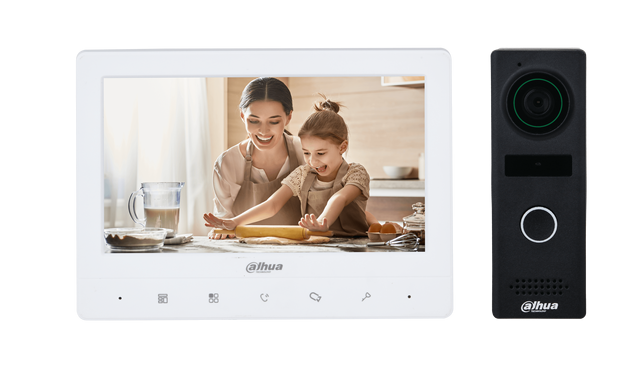
Video Door Phones and Bell for Smart Home
Introduction
In today’s world, security and convenience are top priorities for homeowners and businesses. One of the most effective ways to enhance security and communication at entry points is through video door phones and doorbells. These devices allow individuals to see and communicate with visitors before granting them access, providing peace of mind and improved security.
This guide explores the features, working principles, types, benefits, installation methods, and safety considerations of video door phones and doorbells.
What is a Video Door Phone?
A video door phone (VDP) is an intercom system that enables audio-visual communication between a person inside a building and a visitor at the entrance. It consists of an outdoor unit (camera and microphone) and an indoor unit (display and speaker). Advanced models also feature smartphone integration, allowing remote access and monitoring.
How Does a Video Door Phone Work?
- When a visitor presses the call button on the outdoor unit, the indoor unit gets activated.
- The built-in camera captures real-time video, which is displayed on the indoor monitor.
- The resident can communicate with the visitor via a microphone and speaker.
- If connected to a smart lock, the resident can remotely unlock the door.
What is a Doorbell?
A doorbell is a signaling device typically installed near a door to alert occupants of a visitor’s presence. Traditional doorbells use a chime or bell sound, while modern smart doorbells include video and intercom functions.
Types of Doorbells:
- Wired Doorbells – Connected to a home’s electrical system and often linked to a chime unit.
- Wireless Doorbells – Operate using batteries and radio signals.
- Smart Doorbells – Feature cameras, motion detection, and remote access via mobile apps.
Key Components of a Video Door Phone System
- Outdoor Unit
- Camera (Wide-angle lens for better coverage)
- Microphone and speaker
- Call button
- Night vision (for visibility in low light)
- Indoor Unit
- Display screen (LCD or touchscreen)
- Speaker and microphone
- Call accept/reject buttons
- Door unlock feature
- Power Supply Unit
- Provides power to the video door phone system.
- Smartphone Integration (Optional)
- Allows remote monitoring and access control via mobile apps.
Types of Video Door Phones
- Wired Video Door Phones
- More reliable as they are connected via cables.
- Suitable for permanent installations.
- Requires professional installation.
- Wireless Video Door Phones
- Easier to install and relocate.
- Uses Wi-Fi or radio frequency signals.
- Can be integrated with smart home systems.
- IP Video Door Phones
- Connects via the internet for remote access.
- Provides cloud storage options for video recordings.
- Compatible with smart home automation.
- Multi-Apartment Video Door Phones
- Designed for buildings with multiple units.
- Features multiple indoor monitors connected to a central outdoor unit.
Benefits of Video Door Phones and Smart Doorbells
1. Enhanced Security
- Prevents unauthorized access by allowing visual verification of visitors.
- Some models feature motion detection and automatic recording.
2. Remote Access & Monitoring
- Smart video door phones allow users to monitor their entrance from anywhere via mobile apps.
- Provides real-time alerts when motion is detected.
3. Two-Way Communication
- Eliminates the need to physically approach the door.
- Useful for elderly individuals or physically challenged persons.
4. Night Vision & Motion Detection
- Infrared cameras enable clear visibility in low-light conditions.
- Motion sensors alert homeowners of suspicious activity.
5. Smart Home Integration
- Can be connected to smart locks, security systems, and other IoT devices.
- Voice assistant compatibility (Alexa, Google Assistant).
6. Convenience & Comfort
- Users can accept deliveries without opening the door.
- Reduces unnecessary interruptions by allowing screening of visitors.
Installation Guide for Video Door Phones & Doorbells
Step 1: Choosing the Right Location
- Place the outdoor unit at an optimal height (4-5 feet) for best visibility.
- The indoor unit should be easily accessible inside the house.
- Avoid direct sunlight or areas exposed to heavy rain (unless weatherproof).
Step 2: Mounting the Outdoor Unit
- Drill holes and fix the mounting plate securely.
- Ensure the camera lens has a clear view of visitors.
Step 3: Connecting the Power Supply
- Wired models require electrical wiring connections.
- Wireless models operate on batteries or a rechargeable power supply.
Step 4: Configuring the Indoor Unit
- Connect the indoor monitor to the power source.
- Pair with the outdoor camera if using a wireless model.
Step 5: Setting Up Smart Features
- Download the app and connect the device to Wi-Fi.
- Adjust notification and security settings as per preference.
Safety Considerations
1. Data Privacy & Security
- Use encrypted connections to prevent hacking.
- Regularly update firmware and passwords for smart devices.
2. Avoid False Alarms
- Adjust motion detection sensitivity to prevent unnecessary alerts.
- Position cameras strategically to avoid capturing irrelevant movements.
3. Power Backup
- Ensure a battery backup is available for wired models in case of power failure.
4. Weather Protection
- Use weather-resistant outdoor units to ensure longevity in harsh conditions.
5. Regular Maintenance
- Clean camera lenses for clear video feed.
- Test the doorbell and intercom system periodically.
Common Applications of Video Door Phones & Doorbells
1. Residential Homes
- Enhances family security and allows remote access to visitors.
- Useful for screening unknown visitors and delivery personnel.
2. Apartment Complexes
- Multi-unit systems allow communication between residents and visitors.
- Can be integrated with access control for gated communities.
3. Commercial Buildings
- Used in offices, banks, and businesses for restricted entry.
- Helps receptionists manage visitors efficiently.
4. Hospitals & Educational Institutions
- Controls access to sensitive areas and ensures staff safety.
Conclusion
Video door phones and smart doorbells have revolutionized home and business security, offering convenience, advanced monitoring, and remote access. Whether for personal or commercial use, investing in these devices ensures enhanced security, efficient visitor management, and peace of mind. By selecting the right system, following proper installation practices, and maintaining security updates, users can maximize the benefits of their video door phone or smart doorbell system.